
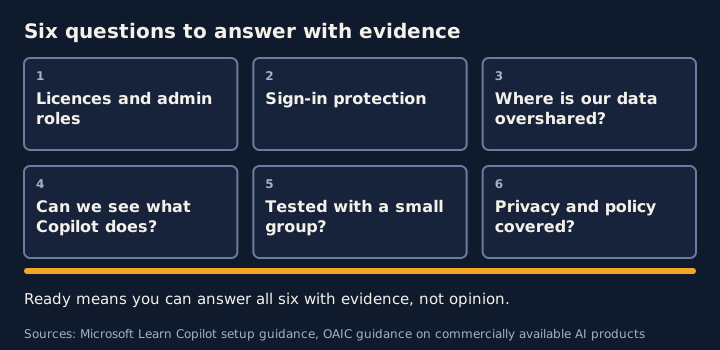
You are ready for Microsoft 365 Copilot when you can answer six questions with evidence: do we have the right licences and admin roles, is sign-in protected, do we know where our overshared data is, can we see what Copilot does, have we tested with a small group, and have we dealt with privacy and policy. This checklist walks through each one.
It draws on Microsoft’s published guidance, the OAIC’s guidance on commercially available AI products, the Digital Transformation Agency’s evaluation of the Australian Government’s Copilot trial, and guidance from the Australian Signals Directorate.
1. Licences and admin roles
- You need the right administrator roles for the Microsoft 365 admin center, the SharePoint admin center and the Microsoft Purview portal.
- Microsoft’s setup guide says Copilot is included in Microsoft 365 E7 and is an add-on to other plans, and that some features, such as Purview and SharePoint Advanced Management, may need extra licences.
- Users need Microsoft 365 licences first, then Copilot licences. Microsoft notes Copilot can take up to 24 hours to appear in apps.
2. Sign-in protection
- Enable multifactor authentication for all users.
- Review conditional access policies.
- Educate users.
These come from Microsoft’s setup guidance, which treats them as part of security measures before deployment.
3. Your data
- Find overshared content. Start with the SharePoint data access governance reports.
- Review SharePoint search and Advanced Management policies, as Microsoft’s readiness checklist suggests.
- Use sensitivity labels, but know their limits. A container label does not label the files inside it, and a label alone will not fix oversharing.
4. Audit and visibility
Microsoft’s guidance lists enabling unified audit logging in Microsoft Purview, configuring retention, and reviewing the logs regularly. It also recommends enabling Purview Audit for Copilot activity.
5. A pilot before a rollout
Microsoft’s readiness checklist suggests setting up a test environment, running a pilot with a select group, and developing a communication plan. Its deployment guidance describes three phases: pilot, deploy and operate. Make sure the network meets Copilot’s requirements.
6. Privacy and policy
The OAIC says privacy obligations apply to personal information put into an AI system, and to AI output that contains personal information. Its guidance for organisations adopting a commercial AI product includes:
- Due diligence before adoption: whether the product has been tested for the intended use, how human oversight will work, the privacy and security risks, and who has access to inputs and outputs.
- Not treating due diligence as set and forget, with regular review, staff training and monitoring.
- A privacy by design approach, including a Privacy Impact Assessment.
- Updating privacy policies and notices to describe AI use.
What Australian Government sources add
The Digital Transformation Agency’s evaluation of the Copilot trial. The Australian Government announced a six-month whole-of-government trial of Microsoft 365 Copilot on 16 November 2023. The DTA’s evaluation says it distributed over 5,765 licences between January and June 2024. Its findings bear directly on readiness:
- It says poor data security and information management processes could lead to Copilot inappropriately accessing sensitive information.
- Trial participants reported that Copilot let some of them reach documents they should not have had permission to access, and surfaced sensitive data that staff had not classified or stored appropriately. The report puts this largely down to organisations not having properly assured the security and storage of some data before adopting Copilot.
- An agency representative interviewed by the DTA called it “a governance and data management issue - not a Copilot issue”.
- Among its recommendations, agencies must configure their information systems, permissions and processes to safely accommodate generative AI products, and the Australian Public Service must provide clear guidance on using generative AI.
- A small number of participants raised that a third-party data classification tool used in their agencies did not integrate with Copilot. The report says DTA interviews noted this could lead to staff gaining access to information they did not have permission for. It also records Microsoft’s advice that this was a third-party labelling issue, with a fix planned, and notes such integrations were out of scope for the trial. That was the position at the time, so check how your own classification tools behave with Copilot today.
Keep the limits in mind. The trial was in the Australian Public Service in 2024, and the report notes that Microsoft released 60 updates to Copilot during it. Treat the findings as evidence about what can go wrong, not as a description of your environment.
ASD’s guidance “Engaging with artificial intelligence”. The Australian Cyber Security Centre published it on 24 January 2024, developed with partner agencies from the United States, United Kingdom, Canada, New Zealand and other countries. It is general guidance on using AI systems securely, not about Copilot. Its key actions are not to enter sensitive or classified information into AI tools unless that has been approved, to check AI-generated results carefully, to learn how AI tools use and store your data, and to follow your organisation’s policies. It also prompts organisations to ask questions that map onto this checklist:
- Do you require phishing-resistant multifactor authentication to access AI systems?
- Are privileges granted on a need-to-know and least privilege basis?
- Can you trial the system in a low-stakes environment first?
- Are staff trained on what data can and cannot be put into the system, and how far its outputs can be relied on?
- Do you log and monitor inputs to and outputs from the system?
Newer ASD guidance on AI. The “Engaging with artificial intelligence” guidance above dates from January 2024. ASD has since published more, none of it specific to Copilot:
- AI data security (23 May 2025) is guidance on managing data security risks in AI systems. Its key actions include detecting and assessing data risks across the AI lifecycle, protecting training and operational data with strong access controls and encryption, and validating and monitoring data inputs. It is written for those who design, deploy or manage AI systems, so it is more relevant if you build or integrate AI than if you only switch Copilot on.
- Careful adoption of agentic AI services (1 May 2026) was co-authored by ASD’s ACSC with agencies from the United States, Canada, New Zealand and the United Kingdom. Its key actions are to limit initial use to low-risk, well-defined tasks and to apply strong oversight, continuous monitoring and human control. It says strict adherence to least privilege is critical for agents, because the privileges assigned to an agent directly determine the risk it can introduce. If your rollout will include AI agents, that is a reason to add agent permissions to question 3 above.
- Frontier AI cyber threat considerations for boards of directors (8 September 2026), developed alongside the Australian Institute of Company Directors, is aimed at boards. It lists restricting unnecessary privileges, including for AI agents, among its short-term priorities, and asks boards whether they rely on vendors and service providers without enough governance and oversight.
ASD’s Blueprint for Secure Cloud. This is an ASD online tool for designing, configuring and deploying secure cloud workspaces, with a current focus on Microsoft 365. It includes a Copilot section describing a baseline configuration, which ASD says should not be read as prescriptive. It is primarily developed for Australian Government organisations, though ASD says private-sector organisations may find it useful. ASD recommends using it alongside the Information Security Manual, the Essential Eight and its cloud security guidance, and says implementing it does not certify or endorse a system as suitable to handle OFFICIAL, OFFICIAL: Sensitive or PROTECTED information.
Making the go or no-go call
Microsoft’s blueprint orders the work as remediate oversharing, set up guardrails, then meet regulations. A reasonable test of readiness is whether the first two are done for the sites and teams in your pilot, and whether the third has an owner and a plan.
A practical way to apply that order: go when the pilot sites have been checked for oversharing, audit is on, and the privacy and policy work has an owner and a date. Go with conditions when one of those is still open but is limited to sites outside the pilot. Hold when the pilot sites have not been checked for oversharing or you cannot see what Copilot is doing. This is our reading of the sources, not a Microsoft rule.
Frequently asked questions
Is there Australian Government guidance relevant to getting ready for Copilot?
In parts. The Digital Transformation Agency evaluated the 2024 whole-of-government Copilot trial and found that poor data security and information management processes could lead to Copilot inappropriately accessing sensitive information. It recommended that agencies configure their information systems, permissions and processes to safely accommodate generative AI. ASD's Australian Cyber Security Centre has published general guidance on engaging with AI, and ASD's Blueprint for Secure Cloud includes a baseline Copilot configuration. These are not a ready-made readiness checklist for a private-sector organisation, so use them as evidence and prompts, not as a checklist.
Should we put personal information into public AI tools?
The Office of the Australian Information Commissioner recommends, as a matter of best practice, not entering personal information, particularly sensitive information, into publicly available generative AI tools. Its guidance covers commercially available AI products more broadly.
Sources
- Set Up Microsoft Copilot and Assign Licenses (Microsoft Learn)
- Secure & Governed Data Foundation for Microsoft Copilot: Foundational Deployment Guidance (Microsoft Learn)
- Guidance on privacy and the use of commercially available AI products (Office of the Australian Information Commissioner)
- Microsoft 365 Copilot evaluation report in full: Executive summary and glossary (Digital Transformation Agency)
- Microsoft 365 Copilot evaluation report in full: Whole-of-government adoption of generative AI (Digital Transformation Agency)
- Engaging with artificial intelligence (Australian Signals Directorate, Australian Cyber Security Centre)
- AI data security (Australian Signals Directorate, Australian Cyber Security Centre)
- Careful adoption of agentic AI services (Australian Signals Directorate, Australian Cyber Security Centre)
- Frontier AI cyber threat considerations for boards of directors (Australian Signals Directorate, Australian Cyber Security Centre)
- About ASD's Blueprint for Secure Cloud (Australian Signals Directorate)
- Copilot (ASD's Blueprint for Secure Cloud configuration) (Australian Signals Directorate)
General guidance for security and privacy teams. For advice on your legal obligations, speak to a lawyer.