
Copilot oversharing is when Microsoft 365 Copilot shows someone content they were technically allowed to open but were never meant to see. Copilot does not break permissions. It exposes the ones you already have.
Copilot follows permissions, and that is the point
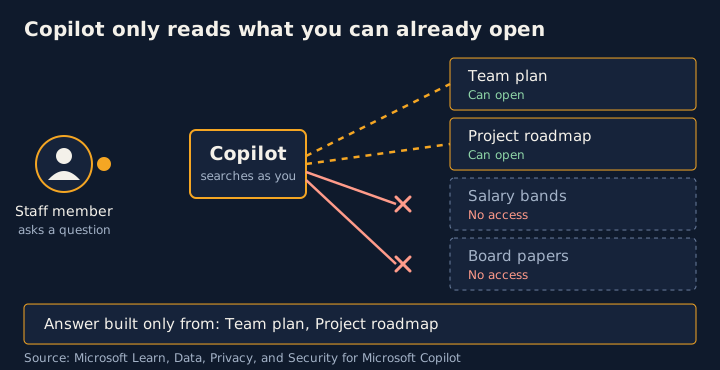
Microsoft says Copilot only surfaces organisational data to which individual users have at least view permission. Its guidance is to use the Microsoft 365 permission models, such as those in SharePoint, to give the right people the right access. That access includes people outside your organisation who were given it through inter-tenant collaboration, such as shared channels in Teams.
So the question to ask before a rollout is not whether Copilot is safe. It is whether your permissions describe who should really see what.
What oversharing means in practice
Most organisations have some files that are open to far more people than anyone intended. Before AI assistants, that mostly stayed hidden, because staff had to know where to look. An assistant that searches across everything a person can reach makes that content easy to find with a plain question.
An illustrative scenario
This is a hypothetical example, not a real organisation. It shows how the gap tends to show up.
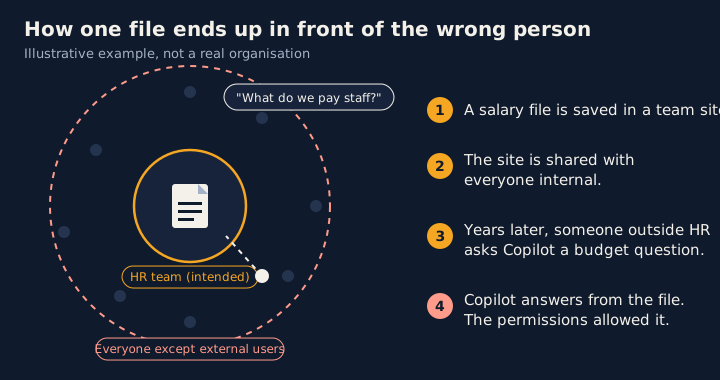
A mid-sized Australian organisation switches on Copilot for its staff. Three years earlier, someone in HR saved a spreadsheet of salary bands and performance ratings into a team site, then shared the site with “Everyone except external users” so a colleague on another team could open it. Nobody remembered doing it. The file was never meant to be seen outside HR, and in practice nobody outside HR ever went looking for it.
A project coordinator asks Copilot to summarise what the organisation has on staff remuneration for a budget paper. Copilot answers from the spreadsheet. It did not break anything. The coordinator was already allowed to open that file, and the permissions said so.
Other common versions of the same problem include a finance workbook on a site many people can edit, an old project site with company-wide sharing links, and board papers in a team that gained members over time.
How the gap forms
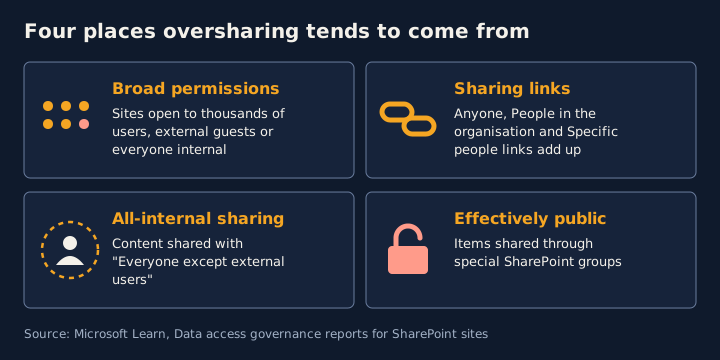
Microsoft’s data access governance reports are built around a handful of patterns. They are a useful list of where oversharing tends to come from:
- Broad site permissions. The site permissions report is designed to find sites with the broadest access, such as access for thousands of users, external guests, or “Everyone except external users”.
- Sharing links. A separate report looks at sites where the most new sharing links were created, including Anyone, People in the organisation and Specific people links.
- Content shared with all internal users. One report finds sites where content was shared with “Everyone except external users”.
- Items that are effectively public. Another finds items shared through special SharePoint groups, which can make them open to everyone in the organisation.
Where we would start
This is advice on order, not a claim about which pattern is most common. We would review the widest audiences first. Items that are effectively public, and content shared with everyone internal, reach the most people. Broad site permissions come next. Sharing links follow. They vary widely in reach, they are quick to create, and they stay in place unless someone reviews them.
Whatever the order, the aim is the same: make the audience for each piece of content match the audience it was meant for.
What oversharing is not
- It is not a flaw in Copilot’s access model. Copilot respects the permissions it finds.
- It does not mean your data trains the models. Microsoft states that prompts, responses and data accessed through Microsoft Graph are not used to train the foundation models.
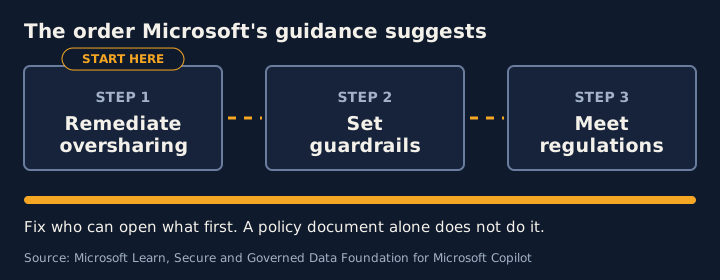
- It is not fixed by a policy document alone. It is fixed by changing who has access.
How to find out if you have it
Start with the data access governance reports in the SharePoint admin center, under Reports. Microsoft’s blueprint for a secure data foundation puts remediating oversharing first, ahead of setting guardrails and meeting regulations.
Frequently asked questions
Does Microsoft 365 Copilot bypass SharePoint permissions?
No. Microsoft states that Copilot only surfaces organisational data that individual users have at least view permission to. The risk is not that Copilot ignores permissions. It is that existing permissions are wider than the organisation intended.
Is oversharing a Copilot fault?
It is a permissions problem that exists before Copilot arrives. Copilot makes it easier to notice, because a question can surface content that nobody went looking for.
Are my prompts used to train the underlying models?
Microsoft states that prompts, responses and data accessed through Microsoft Graph are not used to train the foundation large language models.
Sources
- Data, Privacy, and Security for Microsoft Copilot (Microsoft Learn)
- Data access governance reports for SharePoint sites (Microsoft Learn)
- Secure & Governed Data Foundation for Microsoft Copilot: Foundational Deployment Guidance (Microsoft Learn)
General guidance for security and privacy teams. For advice on your legal obligations, speak to a lawyer.