
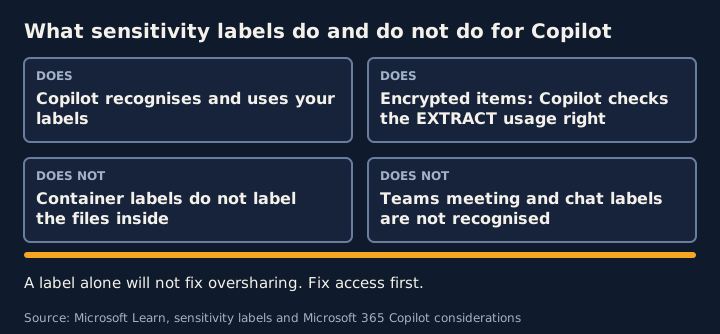
Sensitivity labels help protect content from Copilot, but only in specific ways. Copilot recognises labels, and when a label applies encryption Copilot checks the user’s usage rights. Labels on sites and teams do not reach the files inside them. A label alone will not fix oversharing.
This article summarises Microsoft’s documentation as at the dates in the sources.
What labels do
- Copilot, Copilot Chat and Copilot agents recognise and use your sensitivity labels as an extra layer of protection.
- In Copilot Chat, when an answer draws on several items, users see the label with the highest priority, typically the most restrictive.
- If a label applies encryption, Copilot checks the user’s usage rights and returns data from an item only if the user has permission to copy it. Microsoft calls this the EXTRACT usage right.
- In Word, PowerPoint and Outlook, Copilot supports label inheritance for new content built from a labelled source. Users can override an inherited label.
What labels do not do
Container labels do not label the files inside. Microsoft says items in labelled sites and teams do not inherit the label. A container label controls settings such as privacy, external user access, external sharing and access from unmanaged devices. To label files inside sites, you label them separately.
Encrypted files need a tenant setting. Microsoft says that until sensitivity labels are enabled for files in SharePoint and OneDrive, those services cannot process encrypted files, and Copilot’s access to encrypted content is limited to data in use from Office apps on Windows.
There are documented gaps. According to Microsoft’s considerations page:
- In Copilot Chat, content encrypted separately from its label, granting VIEW but not EXTRACT, can still be returned by Copilot.
- Items protected with Double Key Encryption are not accessible to Copilot.
- Labels on Teams meetings and chats are not recognised by Copilot.
- Labels and encryption on data from plugins or Graph connectors are not recognised.
Using DLP to stop Copilot using labelled content
A Microsoft Purview DLP policy can stop Copilot processing labelled files and emails. The policy uses the Microsoft 365 Copilot and Copilot Chat location, a condition on sensitivity labels, and the action to prevent Copilot from processing content. Things Microsoft documents:
- The item can still appear in the response citations.
- Emails are covered only if sent on or after 1 January 2025, and calendar invites are not supported.
- Policy changes can take up to four hours to reach Copilot.
- DLP cannot scan files uploaded directly into a prompt. It checks only the typed prompt text.
- A separate rule type for sensitive information in prompts is in preview.
What ASD’s Blueprint adds for labels and DLP
ASD’s Blueprint for Secure Cloud is guidance from the Australian Signals Directorate for Microsoft 365. It is written mainly for Australian Government organisations, though ASD says private-sector organisations may find it useful. Its labelling and DLP pages are built around the Protective Security Policy Framework’s classification markings, so apply them with judgement. They do not mention Copilot. They describe label and DLP design in general, which is why they help here. The points that carry over:
- Container labels and library labels do different jobs. Applying a label to a container, such as a Microsoft 365 Group or a SharePoint site, configures access controls, including privacy settings and external sharing restrictions. Applying a label to a document library sets a default label that new documents inherit if they are uploaded without one. That inheritance does not override a label already on a document, whatever its priority. This fits Microsoft’s point that container labels do not label the files inside.
- Default labels have a benefit and a risk. ASD says default labels help prevent under-classification by giving new content a baseline, and are especially useful for file types that cannot be labelled directly. It also says they cannot be widely used in a security context without understanding the risk of mis-labelled information and the lack of personal accountability for marking decisions. Its design decisions are to label all groups, set default labels on all libraries, and rely on container-level access controls for files that cannot be labelled.
- Auto-labelling carries similar risks. ASD says to base triggers on relatively deterministic conditions. It also notes that client-side auto-labelling features may not be consistently implemented across commonly used Microsoft 365 applications, so check and test before relying on them.
- Sensitive information types need local context. ASD says they are pattern-based classifiers that can be hard to implement without knowing the organisation’s own context, and that doing so without it can mean excess false positives or false negatives, excess administrative alerts and a poor user experience. It suggests trying policies in simulation mode to assess how well they work before they are enforced.
- DLP is complex, and the user experience varies. ASD says an effective DLP policy can be complex because of the many options and the interactions with other Microsoft 365 services and with other Purview capabilities, such as auto-labelling. Rules are evaluated in priority order, and the most restrictive action wins. Some applications cannot show policy tips and others show them slowly, so an action can happen before the tip appears. ASD suggests using both policy tips and email notifications. For endpoint DLP, it suggests onboarding devices and watching events in Activity Explorer before creating policies.
What this means for your plan
Labels protect content that has been labelled, so they only help as far as your labelling reaches. Fix access first, then use labels and DLP for the content that needs extra protection.
Frequently asked questions
Does Copilot respect sensitivity labels?
Yes. Microsoft says Copilot and Copilot agents recognise and use sensitivity labels as an extra layer of protection. If a label applies encryption, Copilot returns data from an item only if the user has the EXTRACT usage right.
Do site or team labels apply to the files inside them?
No. Microsoft says items in labelled containers do not inherit the label. A container label controls settings such as privacy and external sharing, not item-level markings or encryption.
Can we stop Copilot using a labelled file?
Yes, with a Microsoft Purview DLP policy on the Microsoft 365 Copilot and Copilot Chat location, using a sensitivity label condition and the action that prevents Copilot from processing content. Microsoft notes the item can still appear in citations.
Sources
- Learn about sensitivity labels (Microsoft Learn)
- Use Microsoft Purview to manage data security and compliance for Microsoft 365 Copilot and Copilot Chat (Microsoft Learn)
- Considerations for Microsoft Purview to manage Microsoft 365 Copilot and Channel Agent in Teams (Microsoft Learn)
- Microsoft Purview DLP for Microsoft 365 Copilot and Cowork (Microsoft Learn)
- Use sensitivity labels to protect collaborative workspaces (groups and sites) (Microsoft Learn)
- Enable sensitivity labels for files in SharePoint and OneDrive (Microsoft Learn)
- Information labelling and classification (ASD's Blueprint for Secure Cloud) (Australian Signals Directorate)
- Data loss prevention (ASD's Blueprint for Secure Cloud) (Australian Signals Directorate)
- About ASD's Blueprint for Secure Cloud (Australian Signals Directorate)
General guidance for security and privacy teams. For advice on your legal obligations, speak to a lawyer.